|
Print With My Pic Printable Cards Invitation Templates Photo Calendars Certificates Picture Frames |
|
|
Card maker, certificate maker and calendar maker you can use to add your photo to cards, certificates, calendars and more from Print With My PicFrom the Print With my Pic Blog:
.
|
certificate templates printable calendar templates crossword maker |
 |
PWMP Card Templates Photo Frames Printable Invitations Printable Calendars Certificate Templates Blog |
| You are free to use any resource from this site as an end user. You may not redistribute, copy, modify, transfer, transmit, repackage, charge for or sell any of the materials from this site. Print With My Pic reserves the right to terminate or make changes to this agreement for any reason and without notice. All of the templates, suggestions, and ideas for printables here are for your own home/personal use. Be sure to verify you are free to use the images you add to any templates. Print With My Pic does not supply any products, images or third party copyrighted materials. Print With My Pic strongly discourages any use of images that are copyrighted or users believe may be copyrighted. If you believe anything on this site constitutes a copyright infringement or may violate your copyright in any way, please contact copyright with your information, and the content will be removed. |
Copyright © 2009 - 2025 printwithmypic.com | restrictions | privacy | Mark Cox | contact |
 How to add your image to the makers
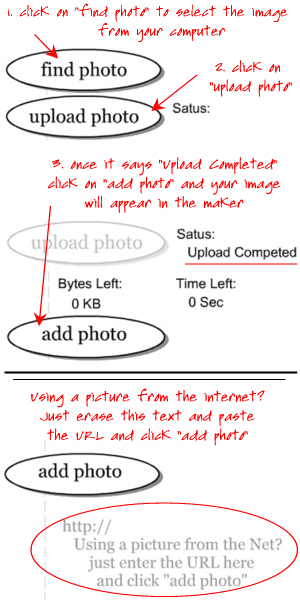 - Each of the makers should load in a new window. Once it loads scroll down and you'll find the image loader tool.